FeaturesGrowContent Studio
Your blog, written and planned
Describe a post and the AI writes it in your voice — headings, lists, free stock photos, categories, tags and its SEO title and description — straight into a WordPress draft, or scheduled for its day. Plan a month of posts as ideas, and see everything published, scheduled, drafted and planned on one calendar, dragging posts between days.
- Posts written in your voice, with photos
- Ideas planned a week (or a day) apart
- A calendar of everything published, scheduled and planned
A post from a sentence
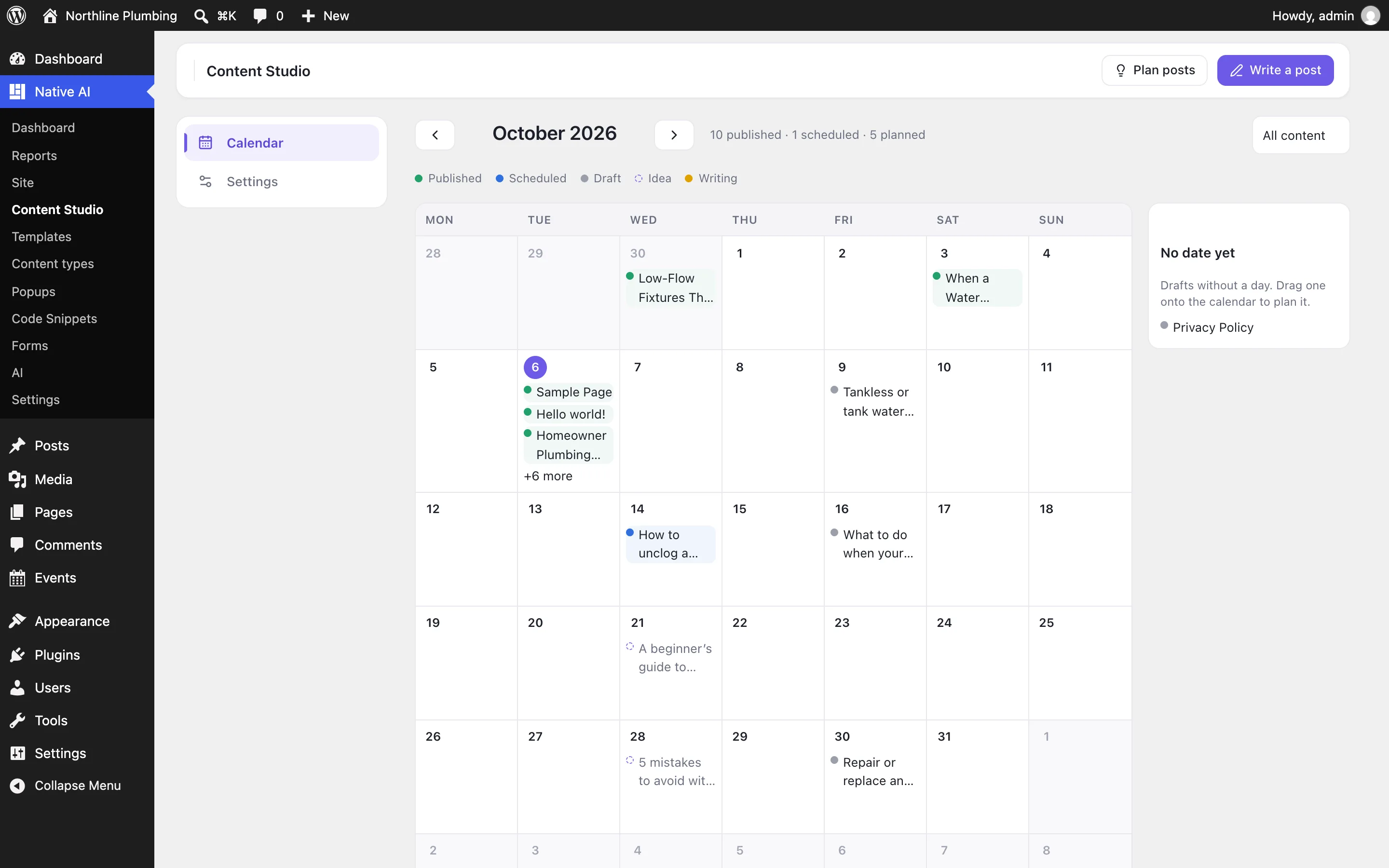
Say what the post should be about, how long, and how many pictures. The AI writes it the way your site speaks — you set the voice once, in Settings — with a clear title, short sections, lists where they help, and a natural next step for the reader. It’s told never to invent prices, awards or anything about your business you didn’t give it.
Free stock photos are found for each picture and the featured image and added to your Media Library with their credit. The post is real WordPress content in the block editor, with its excerpt, category, tags and — with SEO on — its search title and description.
- Short, medium or long
- Up to four pictures and a featured image
- Block-editor content you can edit
Planned by the month
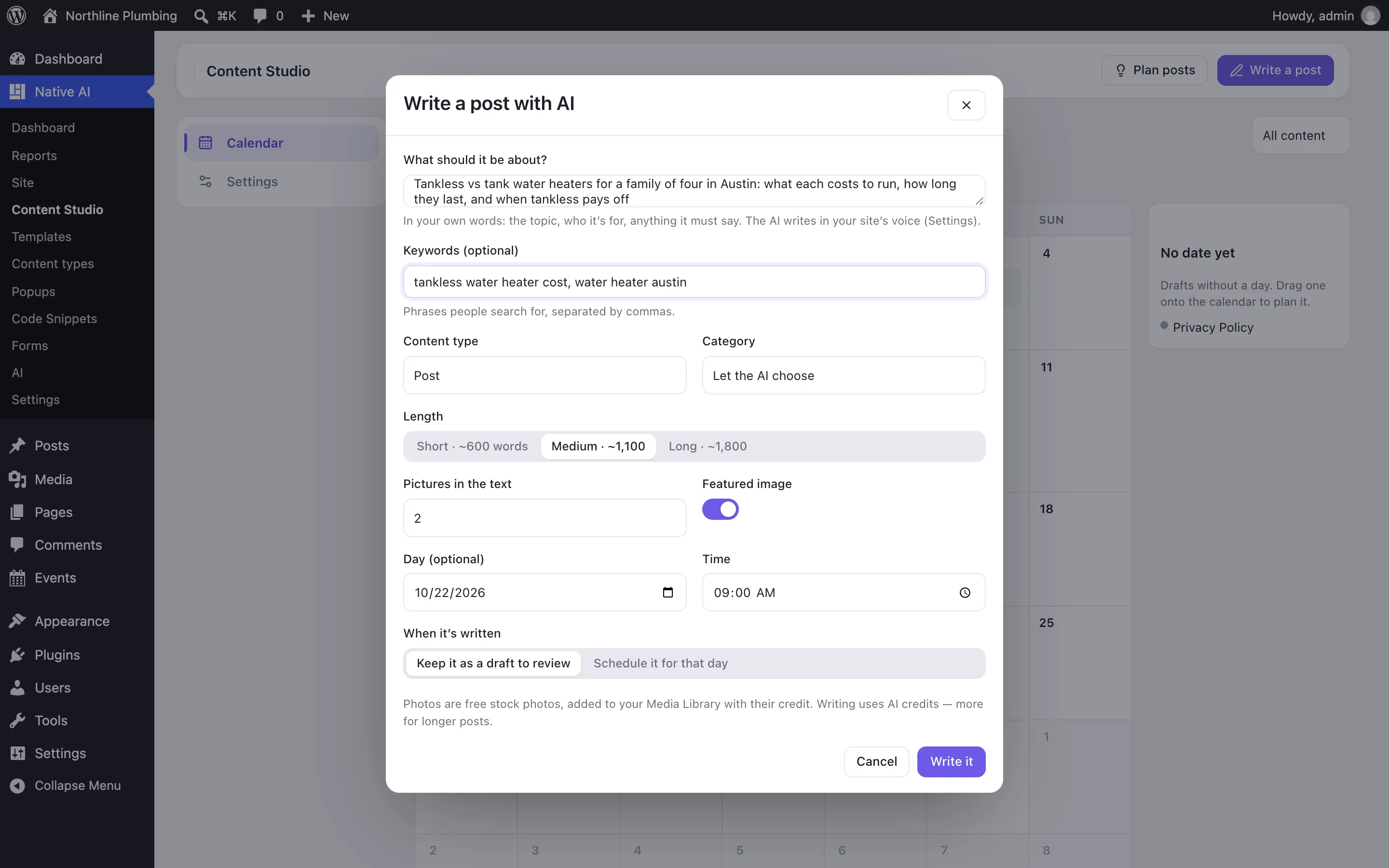
Give a theme and how many posts, and the AI proposes different posts on it — a how-to, a checklist, a cost guide, a common question — each with a title and an angle, placed on the calendar every few days from the day you choose. Open one when you’re ready and it’s written.
The calendar shows everything at once: published posts on the day they went live, scheduled ones on the day they will, drafts and ideas on the day planned for them, and drafts with no day yet beside it. Drag a draft or a scheduled post to another day.
- Plan up to 20 ideas at a time
- Drag posts between days
- Posts, pages and your own content types
Reviewed before it goes live
A written post waits as a draft until someone reads it and schedules it — or, if you choose, it’s scheduled for its day as soon as it’s written. Scheduling needs WordPress’s permission to publish, so writers can draft while an editor decides what goes live.
Writing happens in the background and carries on if you close the screen. Each post uses AI credits, and shows how many when it’s done.
- Draft to review, or scheduled for its day
- WordPress’s own permissions
- Runs in the background
Content StudioEverything included
Everything in content Studio
Writing
- A topic in your words, optional keywords and length
- Your site’s voice and rules, set once
- Headings, paragraphs, lists, quotes and pictures as editable blocks
- Categories and tags from yours first; excerpt; SEO title and description with SEO on
Photos
- Free stock photos for each picture and the featured image
- Added to your Media Library with their alt text and source
- Credit shown under a photo whose license asks for it
Calendar
- Published, scheduled, drafts and ideas by the month
- Drag drafts and scheduled posts between days
- Drafts with no day yet beside the calendar
- Schedule, unschedule, preview and edit from each post
AI
- Write a post, or a planned idea, on request
- Plan a run of posts on a theme
- Move drafts between days and read what’s coming up
- Asks before scheduling a post to publish
Questions about content Studio
Do posts publish on their own?
Only when you want them to. A written post is a draft until someone schedules it, unless you choose “Schedule it for that day” when you write it. Scheduling needs WordPress’s permission to publish.
Where do the photos come from?
Free stock photo libraries (Unsplash and Pexels when the service has their keys, and Openverse). Each is added to your Media Library with its source; a photo whose license asks for credit gets it under the picture.
Can it write pages or other content types?
Yes. Choose the content type when you write or plan; the calendar shows every type, or one at a time.
How much does a post cost?
It uses AI credits from your plan, more for longer posts; the post shows how many it used when it’s done.
Content StudioKnowledge base
How to use it
Step-by-step articles, settings and answers in the knowledge base.
- Write blog posts with AIContent Studio writes a post from a sentence — in your voice, with free stock photos, categories, tags and SEO text — as a WordPress draft or scheduled for its day.
- Plan and schedule posts on the calendarThe content calendar shows a month of posts — published, scheduled, drafts and ideas — and lets you plan a run of posts, move them between days and schedule them.
Works well with
One plugin. One agent. Your whole site.
Start free: a license for one website and AI credits to build with, no card needed. Describe your business and watch Native AI design your home page.