Blog
Stop "Building" Websites. Start Describing Them.
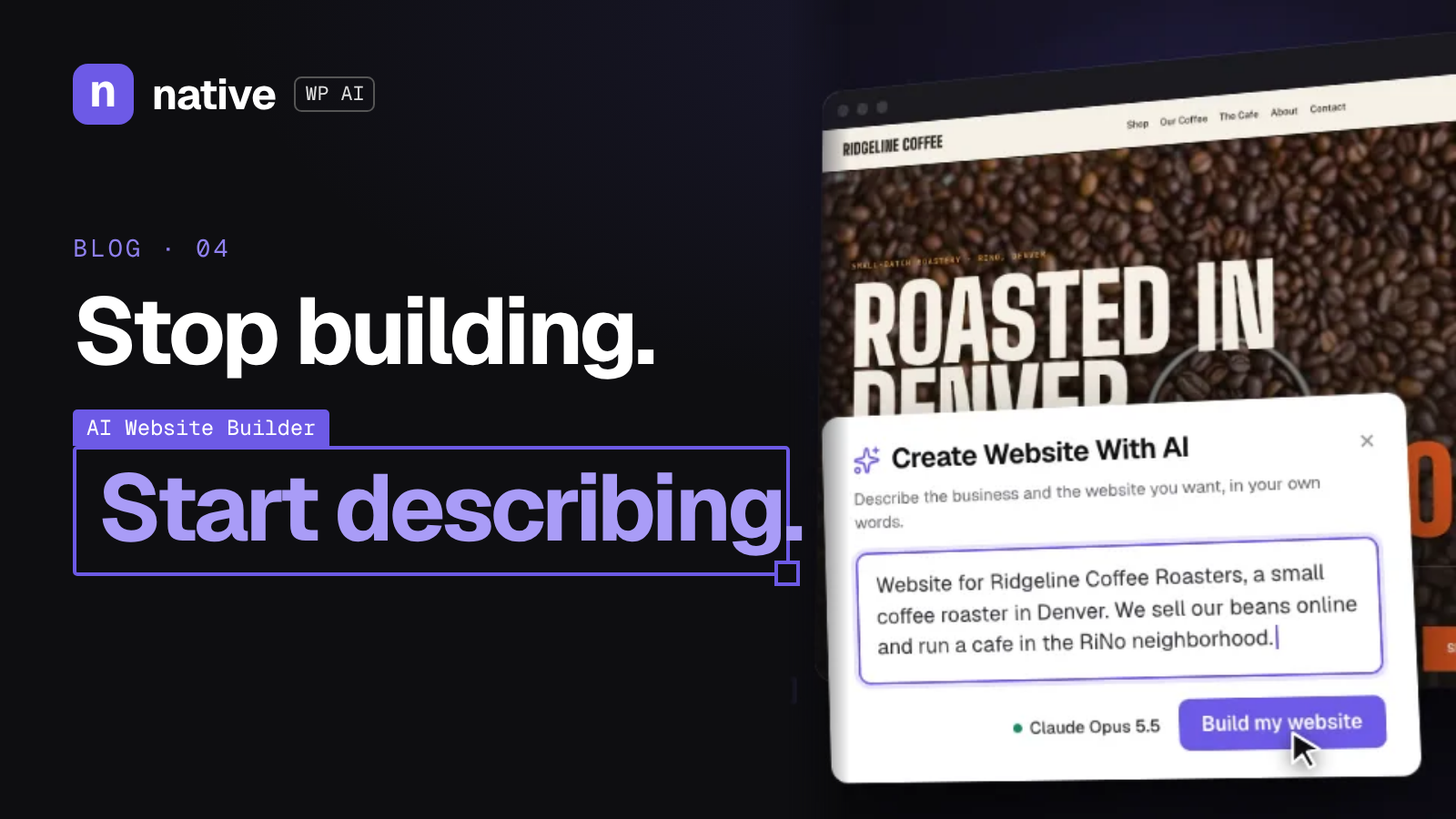
The future of WordPress isn't dragging blocks. It's describing what you want. Here's how to describe a website so an AI agent like Native WP AI can build it well.
On this page
Here's a little secret about every great website you've ever seen: before anybody built it, somebody described it.
"We need a homepage that makes people trust us in five seconds." "The pricing page should feel simple, not salesy." "Put the free course front and center."
The description was always the important part. The building was just the labor of turning words into pixels.
So here's our launch-week manifesto: stop building websites. Start describing them.
The old deal#
For years, the deal with WordPress went like this:
You know what you want.
You translate it into blocks, settings, plugins, and code.
You spend hours on step 2.
You get roughly what you wanted in step 1.
Step 2 is where the time goes. Step 2 is where projects stall, budgets stretch, and great ideas get watered down because "the builder doesn't really do that."
The new deal#
With an AI agent, the deal changes:
You know what you want.
You say it.
The agent builds it.
You review and refine.
That's the idea behind Native WP AI, an AI agent for WordPress that combines a site builder with security, LMS, CRM, and more. You describe the outcome. The agent does the operating.
And because it covers more than pages, your descriptions can go further than "make a homepage." You can talk about courses, contacts, and keeping the site secure, all in one place.
Describing is a skill (a learnable one)#
Here's the catch: "make me a website" is a bad description. Garbage in, beige website out.
The good news is that describing well is way easier to learn than any page builder. You already do it every time you brief a designer or explain your business to a friend.
Here's a simple framework.
1. Start with who it's for#
Bad: "A website for my yoga studio." Better: "A website for my yoga studio. Most visitors are beginners who feel nervous about their first class."
The audience changes everything: tone, layout, what goes first.
2. Say what you want them to do#
Every page needs a job. Book a class? Join the email list? Start a course? Contact sales?
"The main goal is getting beginners to book a free intro class."
3. Describe the feeling#
This is where people skip, and it's where the magic lives.
"Calm, warm, welcoming. Lots of breathing room. Nothing that feels like a gym."
4. List the must-haves#
"Class schedule, pricing, a short About section, a FAQ for first-timers, and a signup form."
5. Mention what to avoid#
"No pushy pop-ups. No stock-photo vibes."
Put it together and you've got a description an agent can actually work with.
Example: from one line to a real brief#
One line:
Make a website for my bookkeeping business.
A real description:
Make a website for my bookkeeping business. My clients are small business owners who are stressed about taxes and hate spreadsheets. The main goal is getting them to book a free 15-minute call. It should feel calm, trustworthy, and human, not corporate. I need a homepage, services, pricing, an About page, and a contact form. Add a free mini-course on "getting your books ready for tax season" that collects emails. Keep it simple and skip the jargon.
See how much more there is to work with? And notice that last bit: a mini-course that collects emails. With Native WP AI, the course (LMS) and contact tracking (CRM) live alongside the site builder, so you can describe the whole business, not just the pages.
Refining is just more describing#
Your first version won't be perfect. That's fine. You refine the same way you started: with words.
"Make the hero section shorter. People should see the button without scrolling."
"This feels too formal. Loosen up the headlines."
"Move the FAQ above the pricing."
Compare that to digging through padding settings and column widths. It's a conversation, not a scavenger hunt.
Why this matters for everyone#
Creators#
Your ideas are the valuable part. Describing lets you stay in idea mode instead of switching into operator mode.
Agencies#
You already write briefs for every project. Now the brief is a big part of the build. Your strategy and taste carry over directly, and the grind shrinks.
Business owners#
You know your business better than anyone. If you can explain it, you can describe a site for it, without learning a whole toolset first.
"Isn't the building part where the craft is?"#
Some of it, sure. Design taste, layout instincts, knowing what converts: that's craft, and it matters more than ever.
But dragging a block 4 pixels to the left isn't craft. It's labor. Describing frees you to put your energy into the decisions, not the clicks.
You're still the architect. You just don't have to lay every brick.
Your first description challenge#
Try this today:
Pick one page you need: a landing page, an About page, a course page.
Write a description using the five steps: who, what action, what feeling, must-haves, what to avoid.
Give it to Native WP AI.
Refine it with two or three follow-up descriptions.
Then ask yourself honestly: how long would that have taken the old way?
The bottom line#
Websites were always described first and built second. The building part is finally catching up to the describing part.
So put down the drag handles. Pick up your words.
Try describing your next site with Native WP AI. Start your 14-day free trial at nativewp.io (500 AI credits, no card needed).
Was this post useful?
Comments
No comments yet. Start the conversation.