DocsDynamic data & loops

Dynamic data

Put WordPress data — the post’s title and date, the author, custom and ACF fields, the visitor’s name, the current year — into any text, link, image or setting, with a fallback for empty values.

How it works#

Dynamic data is written as a token inside ordinary text: Written by {author_name} on {post_date:F j, Y}. When the page is shown, Native AI replaces each token with its value. Tokens work in any text, link, image, HTML attribute and background, and in form fields, menu labels and conditions.

  • {name} — a value, like {post_title}.
  • {name:argument} — with an argument, like a date format or a field name: {custom_field:city_name}.
  • {name|fallback} — with text to show when the value is empty: {custom_field:city_name|our city}.

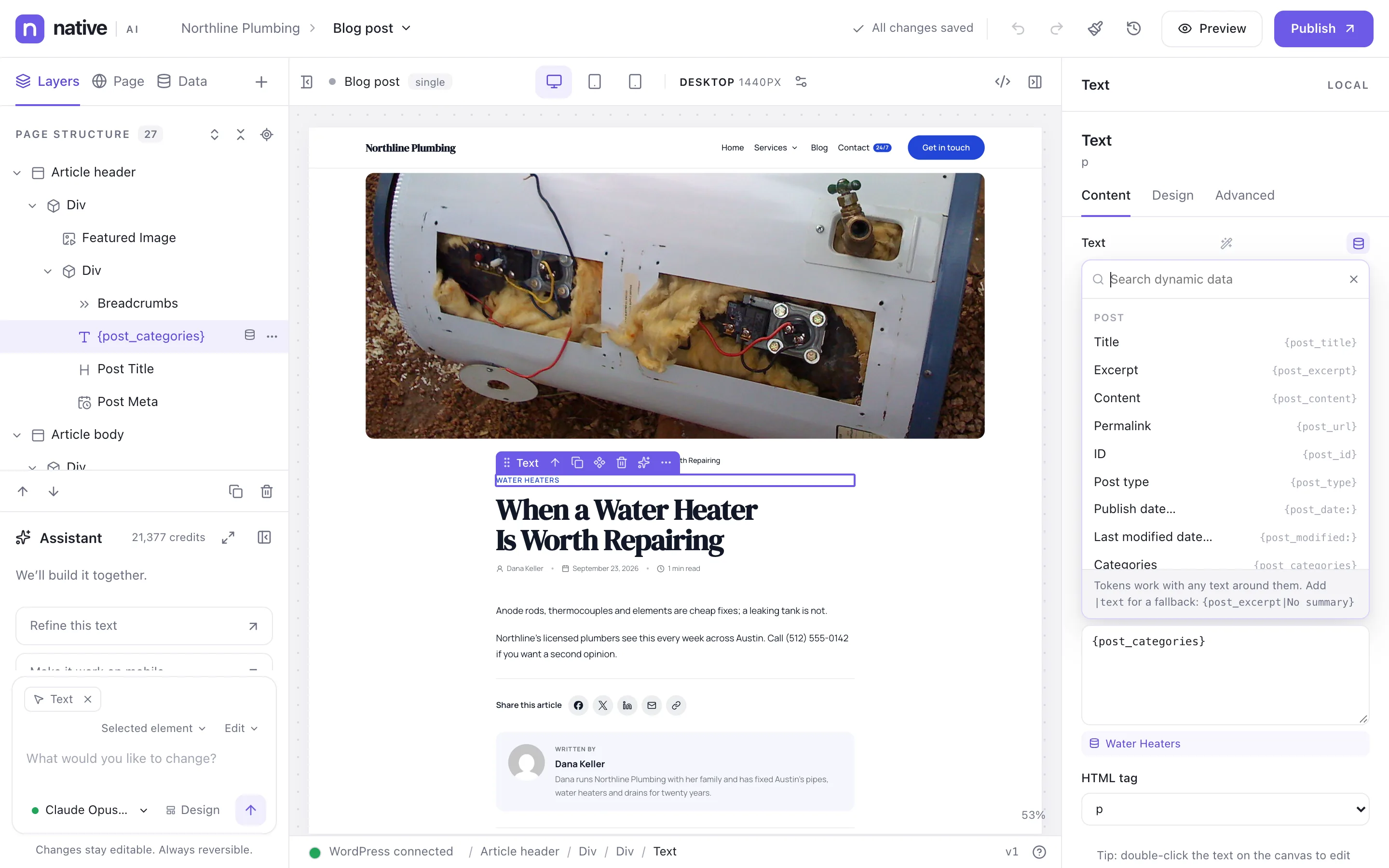
You don’t have to type them: every field that accepts dynamic data has a picker next to it, grouped and searchable, that asks for the argument and the fallback and shows a live preview. The canvas shows real values from a preview post, so templates look like the real thing while you design.

A blog post template with dynamic data: the picker lists post, author, site and custom fields to insert into any text
The dynamic data picker: post, author, site and custom fields.

Every token#

58 tokens:

Post

TokenShows
{post_title}Title
{post_excerpt}Excerpt
{post_content}Content
{post_url}Permalink
{post_id}ID
{post_type}Post type
{post_date:F j, Y}Publish date
{post_modified:F j, Y}Last modified date
{post_categories}Categories
{post_tags}Tags
{post_terms:category}Terms of a taxonomy
{post_comments}Comment count
{reading_time}Reading time (minutes)
{featured_image}Featured image
{featured_image_url}Featured image URL
{featured_image_alt}Featured image alt text

Author

TokenShows
{author_name}Name
{author_bio}Bio
{author_url}Posts page URL
{author_avatar}Avatar
{author_meta:twitter}Author field

Site

TokenShows
{site_title}Site title
{site_tagline}Tagline
{site_url}Home URL
{site_logo}Logo

Logged-in user

TokenShows
{user_name}Display name
{user_first_name}First name
{user_email}Email
{user_role}Role
{user_avatar}Avatar
{user_meta:company}User field

Archive, term & search

TokenShows
{archive_title}Archive title
{archive_description}Archive description
{term_name}Current term name
{term_description}Current term description
{term_url}Current term URL
{term_meta:color}Term field
{search_query}Search query

Custom fields

TokenShows
{custom_field:city_name}Custom field
{acf:price}ACF field
{acf_image:hero_image}ACF image
{acf_url:brochure}ACF link or file URL

WooCommerce product

TokenShows
{product_price}Price
{product_regular_price}Regular price
{product_sale_price}Sale price
{product_sale_badge}Sale badge
{product_rating}Average rating
{product_review_count}Review count
{product_sku}SKU
{product_stock}Stock status
{product_add_to_cart_url}Add to cart URL
{product_add_to_cart_text}Add to cart text

Date & time

TokenShows
{current_date:F j, Y}Today’s date
{current_year}Current year

URL & query

TokenShows
{url_param:utm_campaign}URL parameter
{query_var:paged}Query variable

External & loop data

TokenShows
{api:player.name}Data field
{item:name}Loop record field

Tokens can be formatted — {item:price~currency(USD)}, {post_date~ago} — see Format dynamic values.

In loops and templates#

Inside a Query Loop, post tokens show each result’s own data. In a template, they show the post, term or author being viewed. {item:…} reads the current record of a loop over external data, and {api:@source.path} reads a data source anywhere on a page.

Custom fields and ACF#

  • Custom fields and Advanced Custom Fields (when ACF is active) appear in the picker with their labels; ACF images and links have their own tokens.
  • Private fields (names starting with _) and fields that look like credentials are hidden. Settings → Dynamic data → Always allow these custom fields makes exceptions; Never show these custom fields hides more.
  • Settings → Dynamic data → Advanced Custom Fields turns ACF support off.

Safety#

Values are escaped for where they go: plain text in text, safe URLs in links (anything unsafe becomes #), validated values in styles. In the builder, custom fields are only previewed for posts you can edit.