DocsDynamic data & loops
Query Loops
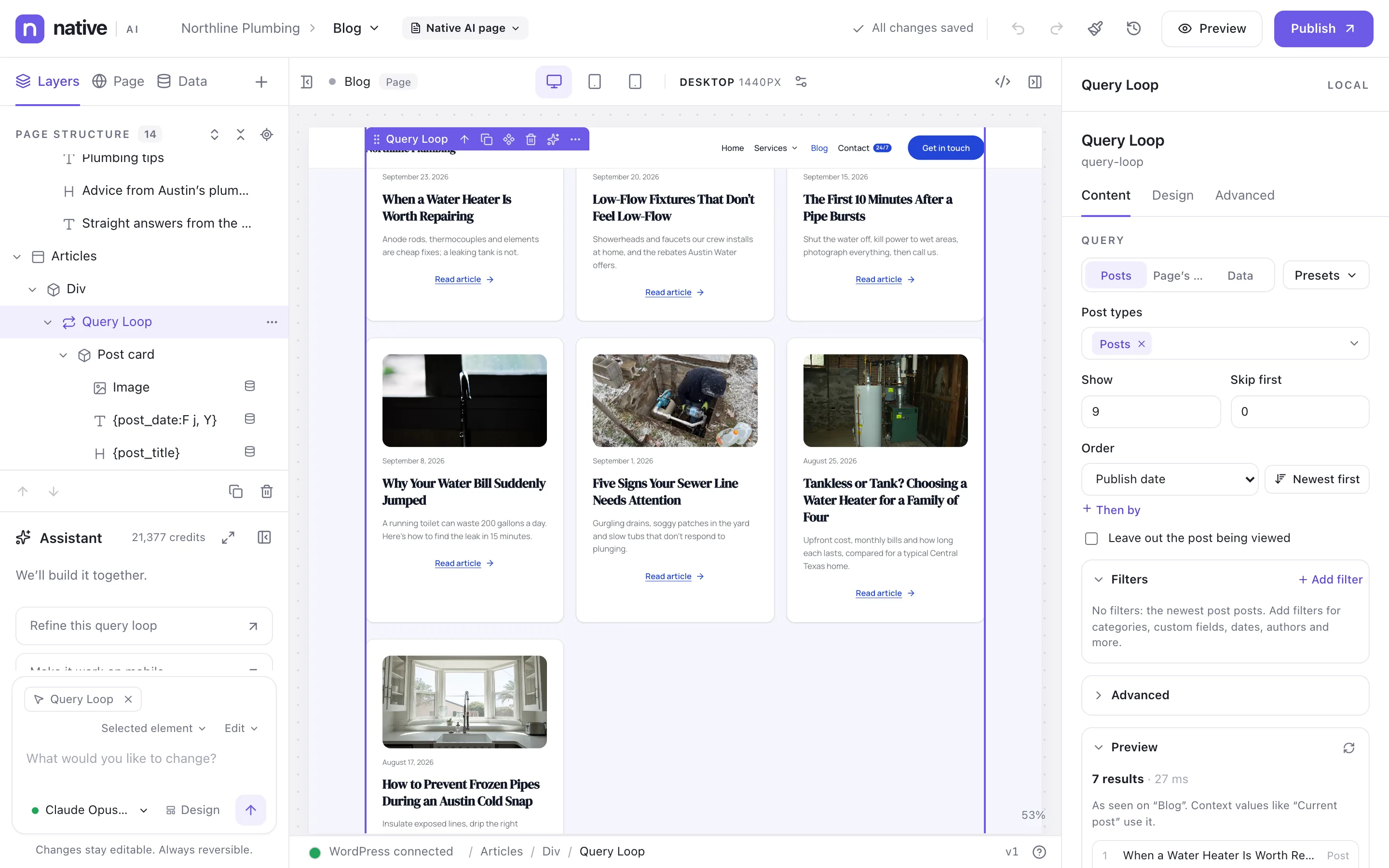
Design one card and it repeats for every post, product or record a query returns — with filters, sorting, pagination, an empty state and a live preview.
A Query Loop has two parts: its design — a Loop Item you design with normal elements — and its query, which decides what it shows. Add one from the element library (Dynamic data → Query Loop) or start from a ready-made loop in the Loops tab.
What’s inside a loop#
| Element | What it’s for |
|---|---|
| Loop Item | The card, designed once and repeated for every result, reading that result’s data. |
| Empty State | What shows when nothing matches. Select it to preview it on the canvas. |
| Error State | For external data: what shows when the data can’t be loaded. |
| Loop Pagination | Page numbers, previous and next, a Load more button or infinite scroll. |
Lay the items out as a grid, a row (flex), a list, masonry or a slider, with columns and gaps per breakpoint.
The query#
Select the loop and open its Content tab. You never type slugs: searchable pickers show names and store what WordPress needs.
- Source — a query of your own, or the page’s own posts on archive and search templates.
- Post types (custom ones included), how many, and how many to skip.
- Order — up to four rules: date, modified date, title, menu order, random, comment count, a custom field (as text or number), ID, author, slug, parent, relevance, and more.
- Filters — categories, tags and any taxonomy; custom fields with every comparison WordPress supports; dates; authors; search; status; sticky posts; parent pages; include or exclude specific posts. Group them with AND/OR, three levels deep.
Custom field filters adapt to the field — yes/no, numbers, dates with relative choices, choices from ACF, relationships including “the current post”.
Queries that follow the page#
@current— the post being viewed (or the enclosing loop’s item): “posts in the same categories as this one”.@parent,@archive(the archive’s term or author) and@user(the visitor).- Any value can be a dynamic data token, and dates can be relative:
today,+7 days,today -1 month.
If a rule’s context is missing (no current post on a search page, say), the rule is skipped with a note instead of returning nothing.
Presets and saved loops#
Built-in presets: Latest posts, Related posts, Posts with the same tags, Current category posts, More from this author, Child pages, Most discussed, Featured (sticky) posts, and Upcoming (by a date field). Save your own queries as presets — a loop can copy a preset or stay linked to it and follow its changes — and save whole loops to the Loops library.
Live preview#
Every loop on the canvas shows its real results. The query panel also shows the results with the values of the tokens the card uses, the WordPress query it runs and how long it took, and notes and warnings.
Advanced mode#
- Arguments — write WordPress query arguments as a PHP array or JSON. They’re read without being run, limited to supported arguments, and merged over the visual query or replacing it.
- PHP — the body of a function that returns the arguments. Only when an administrator turns on Settings → Advanced → Allow PHP in Query Loops, and only for people with the Add custom code permission. Errors are reported to editors, never shown to visitors.
Good to know#
- Visitors only ever see published posts of public post types. Drafts show in the builder to people who can edit them.
- A Global Block inside a Loop Item shows each result’s data — save a card as a Global Block to reuse it.
- Loops can also show external data, terms, and users (never their emails).
- With Analytics on, Track clicks on a loop counts clicks per item, and it can also count which items people see.
- The AI writes queries through the same visual model and never writes advanced mode; if it rewrites a query, arguments or PHP a person added are kept.
Related articles
On the features pages
Still have a question? Email us at support.