DocsTemplates & site structure
Popups
Design popups on the canvas, choose what opens them, who sees them and how often, and see which ones convert — without them ever piling up.
A popup is designed with normal elements — headings, images, native forms, videos, even Query Loops — so it takes your design system. Create one from Native AI → Popups (blank, or from ten templates: Newsletter signup, Lead generation, Contact form, Exit intent offer, Promotional offer, Announcement bar, Full-screen call to action, Cookie notice, Free download, Video).
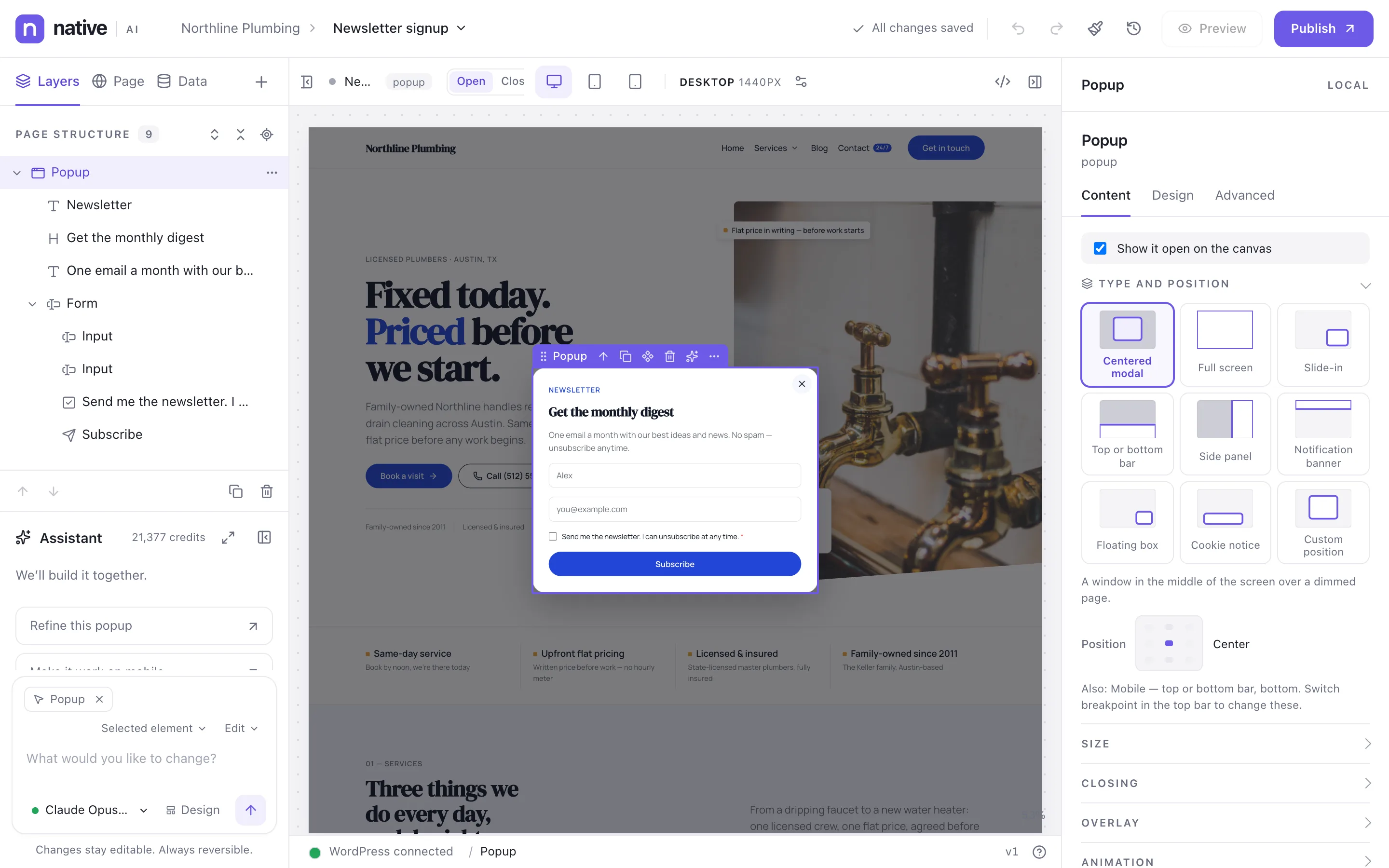
Types#
| Type | What it is |
|---|---|
| Centered modal | A window in the middle of the screen over a dimmed page. |
| Full screen | Covers the whole screen. |
| Slide-in | A card that slides in from a corner without blocking the page. |
| Top or bottom bar | A full-width bar along the top or the bottom (a bottom sheet on phones). |
| Side panel | A full-height panel from the left or the right (off-canvas). |
| Notification banner | A slim notice along the top or bottom that leaves the page usable. |
| Floating box | A small box floating in a corner. |
| Cookie notice | A notice at the bottom that stays until it’s answered, without blocking the page. |
| Custom position | Anywhere on a 3×3 grid; offsets and size in the Design tab. |
Type, position and entrance can change per breakpoint. Closing: a close button (inside or outside), clicking the overlay, Esc, closing after a time or after its form is sent. The overlay can be a color, a gradient, blurred, or none. The canvas shows the popup over a real page of your site, open or closed.
What opens it#
| Trigger | When |
|---|---|
| On page load | As soon as the page is ready. |
| After a few seconds | Seconds after the page is ready. |
| After scrolling | Once the visitor scrolls this far down the page. |
| When an element comes into view | A section scrolls into view. |
| Exit intent | When the visitor seems about to leave (on phones, a quick scroll back up; never in the first two seconds). |
| Click on elements | Clicks on elements you pick. Buttons and links can also open it. |
| Hover over elements | The pointer rests on elements you pick. |
| After a form is sent | A form on the page is sent successfully. |
| Custom event | Another interaction or a script sends this event. |
| After inactivity | No activity for this many seconds. |
| After time on the site | This many seconds into the visit, across pages. |
Who sees it#
A popup’s display conditions choose the pages and the visitors. Besides the usual rules, popups can use rules the browser checks: a URL parameter, a cookie, where the visitor came from, new or returning visitors, pages viewed this visit, what they did with another popup (seen, closed, clicked, submitted, converted), a remembered value, and screen width. See Display conditions.
How often#
- Frequency: every page view, once per session (the default), day, week or month, once ever, or every few days.
- Stop showing after the visitor closes it, submits its form, clicks in it or converts.
- Conversion is a form submission or a click — you choose which counts.
- Priority and stacking: when several popups want to open, the highest priority goes first and the others wait, are skipped, or (if you allow it) show on top.
What a visitor did is remembered in their own browser; nothing is sent to your server. Links and buttons always open their popup, whatever the rules.
Site-wide popup settings#
| Setting (Settings → Popups) | Default |
|---|---|
| Show popups on the site | On — off pauses every popup at once |
| Automatic popups per page view | 2 (0 = no limit) |
| Pause between popups | 3 seconds |
| Ignore frequency rules for editors | Off |
| Popup analytics | On |
| Don’t count visitors who ask not to be tracked | On |
| Remember what visitors did in their browser | On |
Numbers#
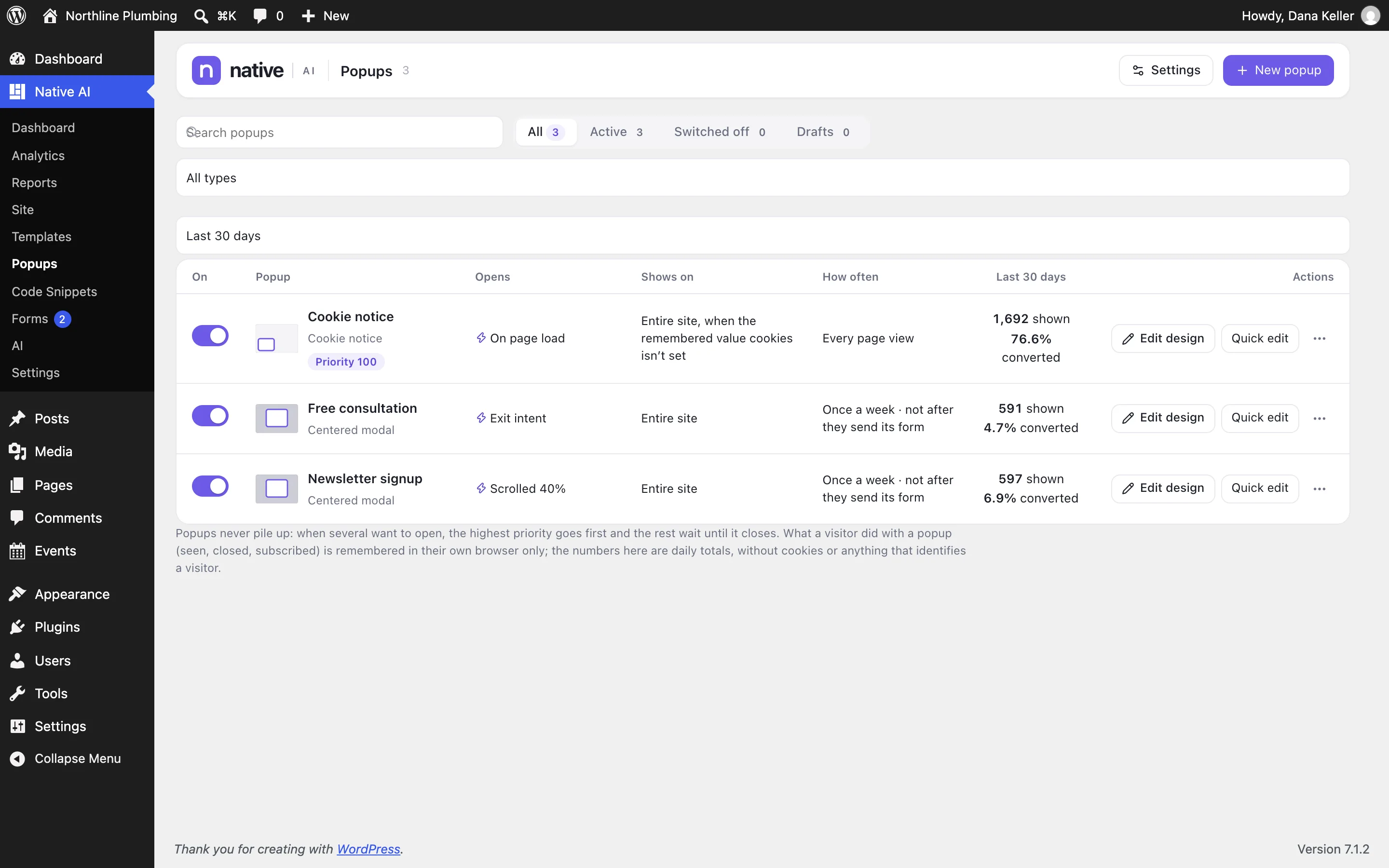
Native AI → Popups lists every popup with its type, what opens it, where it shows, how often, its priority, and its displays, closes, clicks, submissions and conversion rate — daily totals, no cookies, editors not counted. Open one for a chart by date.
Testing#
- Preview shows a popup open over a page, with your latest changes.
- Test opens a page with the popup’s triggers armed, ignoring its conditions and frequency.
- As an editor, add
?nai_popups=debugto any address to see why each popup did or didn’t open, with Open now and Reset.
Related articles
On the features pages
Still have a question? Email us at support.