DocsAccount & settings
Roles and permissions
Decide what each WordPress role can do with Native AI — open the builder, change layouts or only content, use AI, change the design system, manage templates, forms, code, analytics and reports.
Go to Native AI → Settings → Permissions: a matrix of WordPress roles and Native AI permissions. Administrators always have every permission (and so do super admins on multisite).
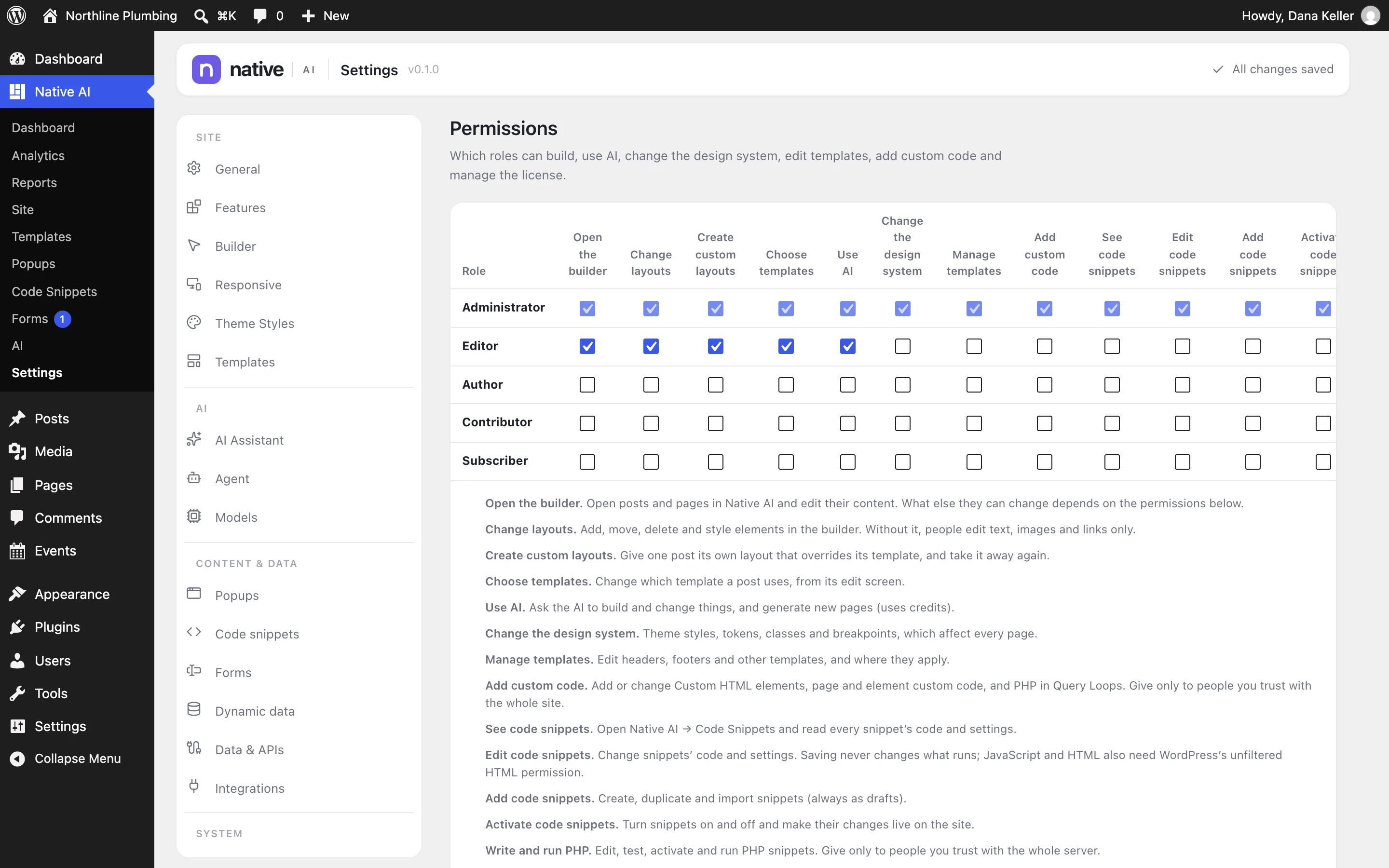
Every permission#
| Permission | Allows | By default |
|---|---|---|
| Open the builder | Open posts and pages in Native AI and edit their content. What else people can change depends on the permissions below. | Administrators, Editors |
| Change layouts | Add, move, delete and style elements. Without it, people edit text, images and links only. | Administrators, Editors |
| Create custom layouts | Give one post its own layout that overrides its template, and take it away again. | Administrators, Editors |
| Choose templates | Change which template a post uses, from its edit screen. | Administrators, Editors |
| Use AI | Ask the AI to build and change things, and generate new pages (uses credits). | Administrators, Editors |
| Change the design system | Theme Styles, tokens, classes and breakpoints, which affect every page. | Administrators |
| Manage templates | Edit headers, footers and other templates, and where they apply. Also popups. | Administrators |
| Add custom code | Add or change Custom HTML elements, page and element custom code, and PHP in Query Loops. Give only to people you trust with the whole site. | Administrators |
| See / Edit / Add / Activate code snippets | Read snippets; change them; create, duplicate and import them (as drafts); turn them on and off. | Administrators |
| Write and run PHP | Edit, test, activate and run PHP snippets. Give only to people you trust with the whole server. | Administrators |
| Manage snippet secrets | Add and change encrypted values that PHP snippets use. | Administrators |
| See snippet logs | Read and clear snippet errors and activity. | Administrators |
| Manage forms | See submissions, analytics and logs, and choose where forms send them. | Administrators |
| Connect integrations | Add and change integration connections (API keys, OAuth, webhook URLs) and data sources. | Administrators |
| See analytics | Open Native AI → Analytics. The AI can answer analytics questions for them. | Administrators |
| Manage analytics | Change Analytics settings, goals and alerts, and reset analytics data. | Administrators |
| See / Generate / Export reports | Read reports and the activity history; create reports; download them as PDF and email them. | Administrators |
| Manage reports | Change report templates and settings, mark problems resolved, delete reports. | Administrators |
| Manage report schedules | Create, change and run scheduled reports and choose who receives them. | Administrators |
| Manage the license | Activate or deactivate the license and see credits. | Administrators |
Code Snippets and Analytics permissions only show while those features are switched on.
WordPress permissions still apply#
- Publishing needs WordPress’s own permission to publish that kind of post.
- Saving site menus needs WordPress’s menu permission (Appearance → Menus).
- JavaScript, HTML and head or footer code need WordPress’s unfiltered HTML capability.
- Form actions that create users or publish posts need those WordPress permissions.
The AI works with the same permissions#
The AI acts in the signed-in person’s own session: it can never do more than they can. For someone with Open the builder but not Change layouts, it only edits content too.
Related articles
Still have a question? Email us at support.