DocsCRM
Email campaigns
Write an email once and send it — now or at a time — to the subscribed contacts in lists, tags or segments; then see who opened, clicked and unsubscribed.
- Write itCampaigns → New campaign. A subject, the preview text inboxes show next to it, and the email: headings, bold, lists, links, buttons and images, or the HTML itself. The preview on the right shows it as it will arrive, with a sample person’s details.
- Choose who gets itEveryone subscribed, or the subscribed contacts in any lists, tags or segments — minus lists and tags to leave out. The number of people updates as you choose.
- Test, then sendSend a test to your own address, then Send now or Schedule it. It saves as you go.
Personalize#
Merge tags fill in each person’s details. After | comes what shows when it’s empty: {{contact.first_name|there}}. Custom fields work as {{contact.key}}.
| Merge tag | Group | Shows |
|---|---|---|
{{ | Contact | First name |
{{ | Contact | Last name |
{{ | Contact | Full name |
{{ | Contact | |
{{ | Contact | Phone |
{{ | Contact | Company |
{{ | Contact | City |
{{ | Contact | Country |
{{ | Site | Site name |
{{ | Site | Site address |
{{ | Site | Business address |
{{ | Links | Unsubscribe link |
{{ | Links | Email preferences link |
{{ | Trigger | A field of the form that started the automation |
{{ | Trigger | WooCommerce order number |
{{ | Trigger | WooCommerce order total |
Sending#
Sending takes a snapshot of who gets it, then sends a batch a minute at the speed set in Settings — you can pause, resume or stop it while it goes. Every campaign email has an unsubscribe link (and the one-click unsubscribe headers inboxes use) and a link to the preferences page, where people choose their public lists or leave everything.
Results#
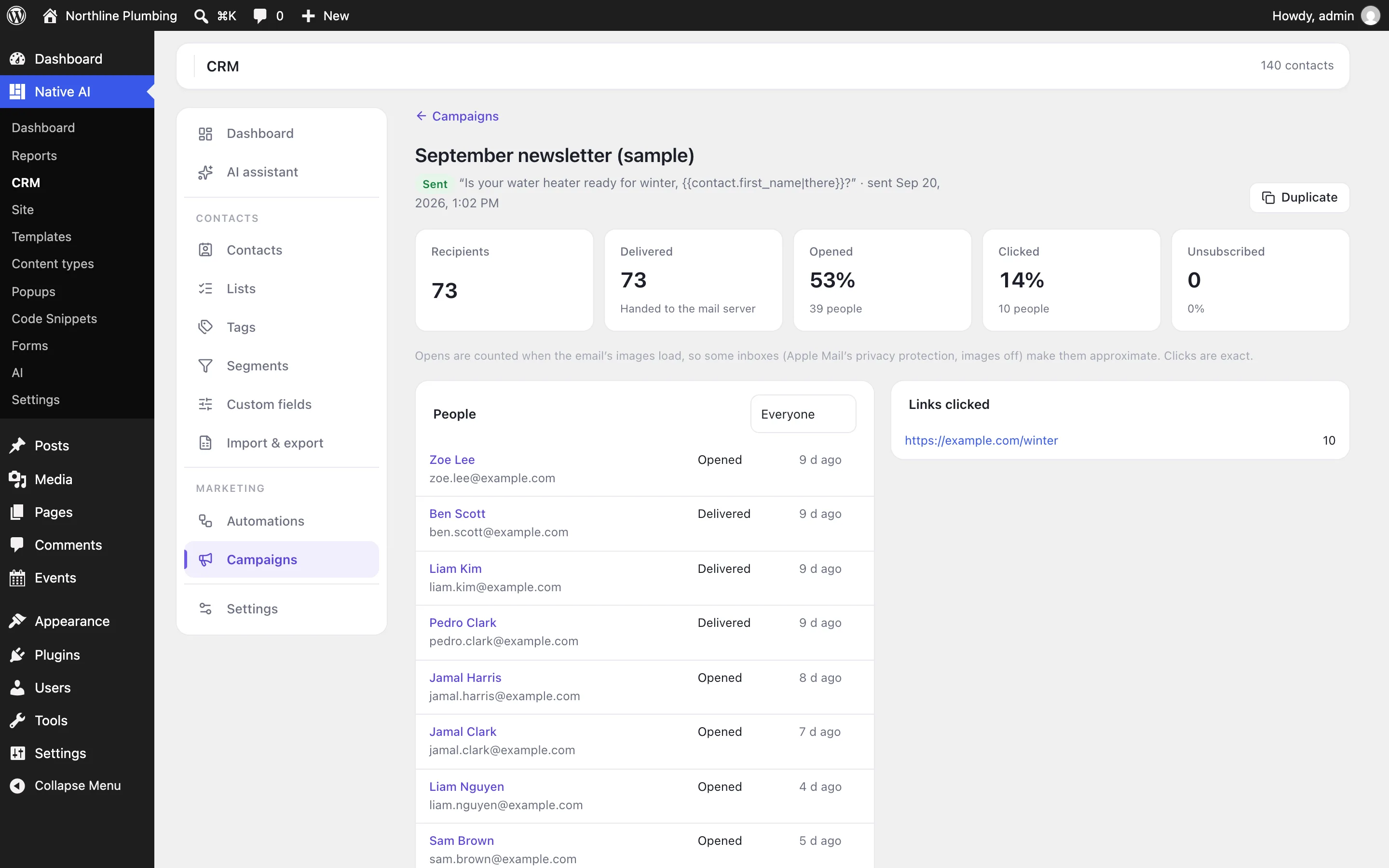
The report shows how many were delivered, opened, clicked and unsubscribed, each person and what they did, and which links were clicked. Opens are counted when an email’s images load, so they’re approximate (some inboxes load images for privacy, others block them); clicks are exact. Switch opens or clicks off in Settings → Tracking.
Double opt-in#
Contacts added as pending — by a form’s CRM action or a Form submitted trigger set to pending — get a confirmation email with a button. Confirming makes them subscribed, which can start a Status changed automation (a welcome email, say). Its subject and text, and where people go after confirming, are in Settings.
On the features pages
Still have a question? Email us at support.