DocsCookie consent
Add a cookie banner that holds back trackers
Cookie consent shows a banner in your site’s design, asks visitors which cookies they allow, and holds back Google Analytics, the Meta Pixel, YouTube and other known scripts and embeds until they do.
Cookie consent is an optional feature that does what a cookie plugin such as CookieYes or Complianz does, inside Native AI. Visitors see a banner with Accept all, Reject all and Customize; until they allow a category, the scripts and embeds of known services in that category don’t run at all.
- Switch it onGo to Native AI → Settings → Features and switch on Cookie consent. The banner appears on your site straight away, and a Cookie consent screen appears in the Native AI menu.
- Scan the siteCookie consent → Cookies & scripts → Scan the site finds the services, scripts and cookies your pages use. Give anything it doesn’t recognise a category. See Scan for cookies.
- Make the banner yoursCookie consent → Banner: a box in a corner, a bar or a pop-up; your design system’s colors (or light or dark); your own words. The preview shows the banner and the preferences window as you change them.
- Add your cookie policyCookie consent → Settings → Create a draft policy makes a Cookie Policy page that lists every cookie by category. Review it, publish it, and the banner links to it.
The four categories#
| Category | What’s in it | Before the visitor chooses |
|---|---|---|
| Necessary | What the site can’t work without: WordPress, the cart, payments (Stripe, PayPal), spam protection (reCAPTCHA, Turnstile) and the visitor’s choice itself. | Always runs |
| Functional | Extra features: chat widgets, maps, privacy-enhanced YouTube. | Held back |
| Analytics | Measuring visits: Google Analytics and Tag Manager, Hotjar, Clarity, Matomo, Vimeo, Native AI Analytics. | Held back |
| Marketing | Advertising and social media: Google Ads, the Meta Pixel, LinkedIn, TikTok, Pinterest, X, Microsoft Ads, YouTube, Instagram embeds. | Held back |
You can move any service to another category on the Cookies & scripts screen, and rename or reword the categories on the Banner screen.
Ask first, or let visitors opt out#
- Ask first (EU, UK) — the default. Nothing optional runs until the visitor allows it. This is what the GDPR and the UK’s rules ask of sites with visitors there.
- Opt-out (US) — everything runs until the visitor opts out; the reject button reads “Do not sell or share my personal information” and turns marketing off. A browser’s Global Privacy Control signal counts as opting out of marketing.
Videos, maps and other embeds#
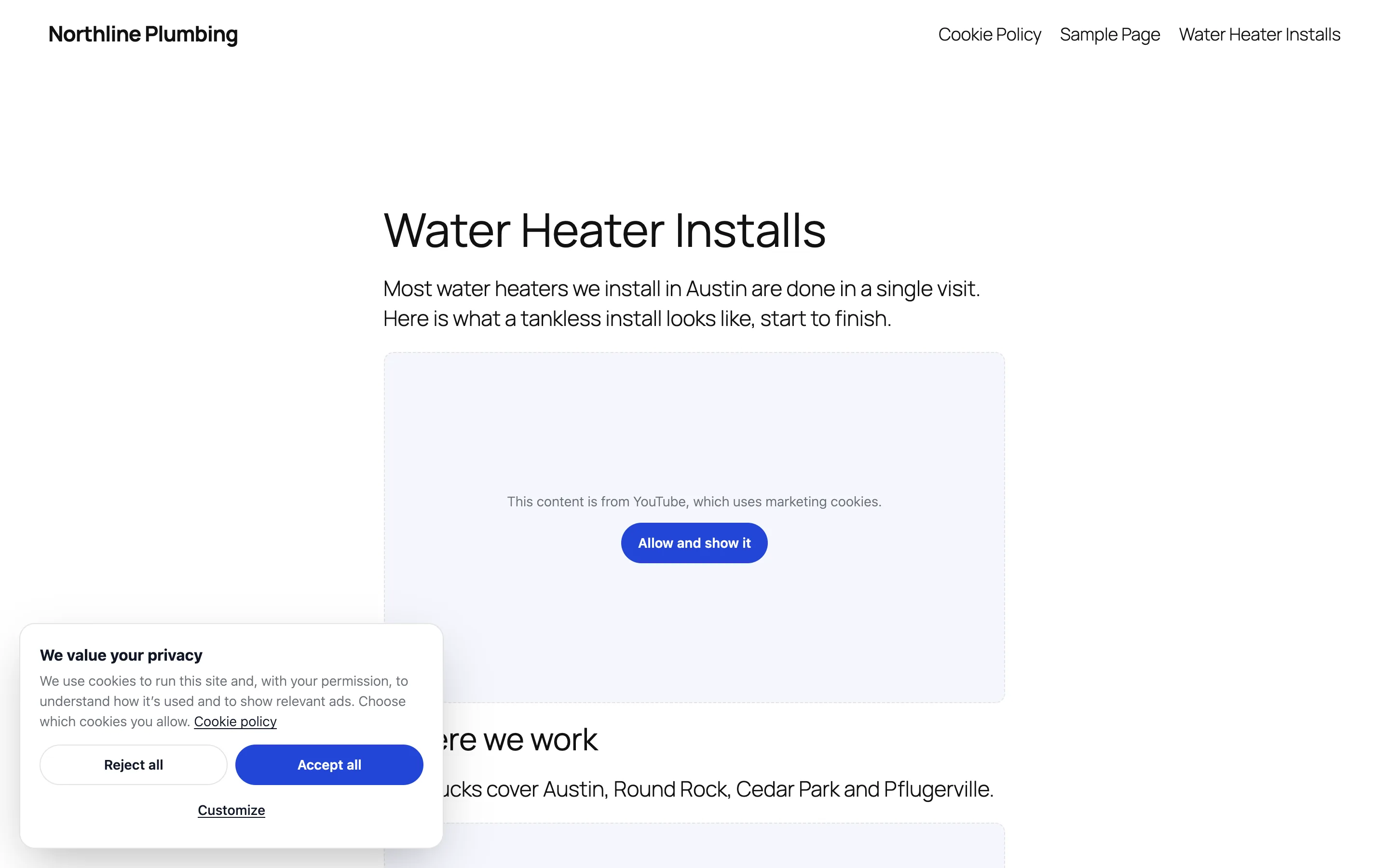
An embed that’s held back — a YouTube video, say — shows a placeholder in its place: “This content is from YouTube, which uses marketing cookies”, with a button that allows that category and shows it.
Google, the WP Consent API and Native AI Analytics#
- Google Consent Mode v2 (on by default): Google’s tags are told “denied” before anything loads and updated with the visitor’s choice, so Google Analytics and Google Ads can measure without cookies when they’re refused.
- The WP Consent API: if it’s installed, plugins that support it (WooCommerce, Site Kit and others) follow the visitor’s choice.
- Native AI Analytics waits until the visitor allows analytics.
Changing the choice later#
A small cookie button in a corner of every page reopens the preferences (switch it off on the Banner screen). Any link to #cookie-settings, and the [nativeai_cookie_settings] shortcode, do the same. When a visitor turns a category off, that category’s cookies the scan found on your site are deleted and the page reloads without its scripts.
The Cookie Notice element#
The builder’s Cookie Notice element is a simple notice that remembers Accept or Decline. While Cookie consent is on it stays hidden, and the site-wide banner asks instead.
Switching it off#
Switching Cookie consent off removes the banner and stops holding scripts back. Nothing is deleted — the settings, the scan and the consent log are there when you switch it back on.
Related articles
On the features pages
Still have a question? Email us at support.